
YouTube ads work for ecommerce when treated as a full-funnel channel, not a direct-response shortcut. Awareness and mid-funnel consideration campaigns build the audience your Video action campaigns later convert. The highest-impact combination is a Video action campaign running a product feed, remarketing sequenced against reach and Shorts activity, and repurposed short-form assets filling the gaps. Launch a 30 to 90 day test built around an awareness reach campaign paired with a Video action campaign carrying a product feed, then judge results on blended performance, not last click alone.
- Use blended performance metrics, including view-through conversions and brand lift, to accurately measure YouTube’s contribution beyond last-click sales.
- Focus on audience targeting signals like in-market, custom intent, and remarketing lists to optimize campaign performance strongly in early weeks.
- Incorporate a full-funnel ad sequence using bumper and Shorts for reach, skippable in-stream for consideration, and Video action for conversions.
- Attach product feeds to Video action campaigns and sequence ads to guide viewers through awareness, consideration, and remarketing stages over one to two weeks.
- Confirm technical setup, including conversion tracking and Merchant Center linking, before launching and testing campaigns for 30 to 90 days without frequent manual changes.
Table of Contents
- YouTube’s role in the ecommerce funnel
- YouTube ad formats and when to use each
- Which audiences and targeting signals actually convert?
- Creative for ecommerce video ads: structure and assets
- Campaign setup: objectives, bidding and budget allocation
- Measurement and attribution for YouTube ecommerce campaigns
- Tactical plays: product feeds, ad sequencing, and Shorts
- Evolve Commerce’s perspective and performance evidence
- What we check before launching YouTube for ecommerce
- Get expert help running YouTube ads for your store
- Sources
YouTube’s role in the ecommerce funnel
YouTube sits above search and shopping ads in the customer journey, not alongside them. Ounass, the luxury fashion retailer, used YouTube as a digital lookbook and lifted consideration by 3.9 million while also seeing downstream gains in Search and Shopping performance. That pattern shows up repeatedly: video does the persuading, search and shopping do the closing.
Set expectations accordingly. In the first weeks of a YouTube programme, assisted conversions and view-through activity typically outweigh direct last-click sales, and judging the channel on last click alone will make it look like it is failing when it is actually building demand elsewhere.
Certain products suit YouTube better than others:
- Visually demonstrable products (skincare, homeware, fashion, gadgets) where seeing the product in motion beats a static image.
- Products in the £50 to £150 customer acquisition cost range, where video’s persuasion power justifies the spend.
- Higher price points that need genuine consideration before purchase, such as furniture or premium electronics.
Google’s own guidance notes that many advertisers see greater incremental long-term ROAS from YouTube than from paid social when it is used as part of a wider media mix, rather than in isolation.
YouTube ad formats and when to use each
YouTube’s format list covers skippable in-stream, non-skippable in-stream, in-feed video, bumper ads, Shorts, and Masthead placements, each billed and used differently.
- Skippable in-stream (tCPV): pay per view or engagement, ideal for consideration and Video action campaigns where you want a genuine watch, not just an impression.
- Non-skippable and bumper (tCPM): bought on impressions, best for pure reach and brand recall in short bursts.
- In-feed video: appears in search and browse results, useful for capturing intent-driven viewers already looking around.
- Shorts: fast, mobile-first reach, cheap to fill with repurposed assets.
- Masthead: premium, expensive, reserved for major launches or seasonal pushes.
The strongest ecommerce programmes sequence these rather than pick one. Bumper or Shorts builds reach cheaply, skippable in-stream carries the consideration message, and a Video action campaign closes the loop. Repurposing existing social creative into Shorts is a recognised way to increase long-term brand growth without commissioning new footage for every placement.
Which audiences and targeting signals actually convert?
Audience selection matters more than creative polish in the early weeks of a YouTube campaign, because Google’s bidding systems need the right signal to optimise against.
- Use Custom Intent audiences and in-market audiences to reach people actively researching products like yours, and reserve these for top and mid-funnel awareness or consideration campaigns.
- Build first-party remarketing lists from site visitors, cart abandoners, and past purchasers, and point these at your Video action campaigns where conversion intent is highest.
- Layer audiences carefully and exclude converters from prospecting campaigns; overlap between an in-market list and a remarketing list wastes budget bidding against your own warm traffic.
- Let Google’s automation (Google audiences, optimised targeting) handle scale once you have a proven creative and clear conversion signal; keep manual lists for the test phase when you need control.
Creative for ecommerce video ads: structure and assets
Ecommerce video creative follows a fairly consistent shape regardless of product category, though the length and pacing shift with the objective.
- 0 to 5 seconds: the hook. State the problem or show the product in action immediately; skippable formats lose most viewers who aren’t grabbed here.
- 5 to 15 seconds: the demonstration. Show the product solving the problem, not just sitting on a shelf.
- Social proof: a review snippet, star rating, or user-generated clip builds trust faster than another product shot.
- Clear CTA: tell viewers exactly what to do, whether that’s “Shop now” or “See the range”.
Reach campaigns can run shorter, punchier cuts; Video action campaigns often benefit from a slightly longer demonstration before the CTA. Repurposing a paid social ad into a Shorts placement, as covered in this guide to optimising your Facebook PPC strategy, keeps creative costs down while filling an extra placement.
Pro Tip: Run a testing matrix across thumbnails, opening three seconds, CTA wording, and which proof element you use, changing only one variable at a time. Random creative swaps make it impossible to tell what actually moved the needle.
Campaign setup: objectives, bidding and budget allocation
Your campaign objective in Google Ads determines which formats and bid types are even available, so this decision comes before creative, not after. Google’s own documentation makes objective selection the first branch in the setup flow.
- Drive conversions (Video action campaigns): use Target CPA or Target ROAS bidding once you have enough conversion volume to feed the algorithm.
- Video reach and views (brand campaigns): use tCPV or tCPM depending on whether you’re paying for engaged views or pure impressions.
- Product and brand consideration: sits between the two, usually bid on tCPV to balance reach with genuine engagement.
For test budgets, commit to a fixed spend across 30 to 90 days rather than adjusting daily. Practitioners consistently flag that frequent manual changes during the learning phase reset Google’s optimisation and delay the point where a campaign becomes efficient.
Measurement and attribution for YouTube ecommerce campaigns
Last-click attribution routinely understates what YouTube is actually doing. View-through conversions, which count purchases from people who saw but didn’t click your ad, are essential reading alongside standard click metrics, and ignoring them makes video look far less productive than it is.
The metrics worth tracking:
- Impressions and TrueView views: reach and genuine engagement (a view counts once someone watches 30 seconds or interacts).
- View-through conversions: purchases following an ad view without a click.
- Engaged-view conversions: a newer metric capturing meaningful engagement short of a full view.
- Brand Lift studies: survey-based measurement of awareness, ad recall, and purchase intent shift.
Blended ROAS, which combines view-through and click-through conversions against total spend, gives a more honest read than last-click ROAS alone. This guide to ROAS measurement breaks down how blended calculations differ from platform-reported figures, which is worth understanding before you present numbers upward. Use a 7-day click, 3-day view conversion window as a starting point, and adjust based on your typical purchase consideration cycle.
Tactical plays: product feeds, ad sequencing, and Shorts
A handful of tactical moves separate YouTube programmes that convert from ones that merely generate views.
- Attach a Merchant Center product feed to your Video action campaigns. This displays a browsable product panel beneath the video, letting viewers click through to specific products rather than a generic landing page, and it can materially increase conversions on eligible campaigns.
- Sequence your ads deliberately: reach ads first to build familiarity, consideration-stage video next, then dynamic remarketing showing the exact products a viewer browsed. Space these over one to two weeks per stage rather than running everything simultaneously.
- Treat Shorts as a reach amplifier, not a separate creative project. Repurpose your best-performing social clips and let them run alongside long-form placements for cheap incremental reach.
Evolve Commerce’s perspective and performance evidence
Evolve Commerce builds full-funnel growth programmes for ecommerce brands, combining paid media management across YouTube, Meta, and TikTok with performance creative production and the AdWize analytics platform for server-side attribution and clearer decision-making. Clients including Hunter, Juicy Couture, Light Mirrors, and FILA have seen annual revenue growth between 130% and 450% through this combined approach, documented across case studies.
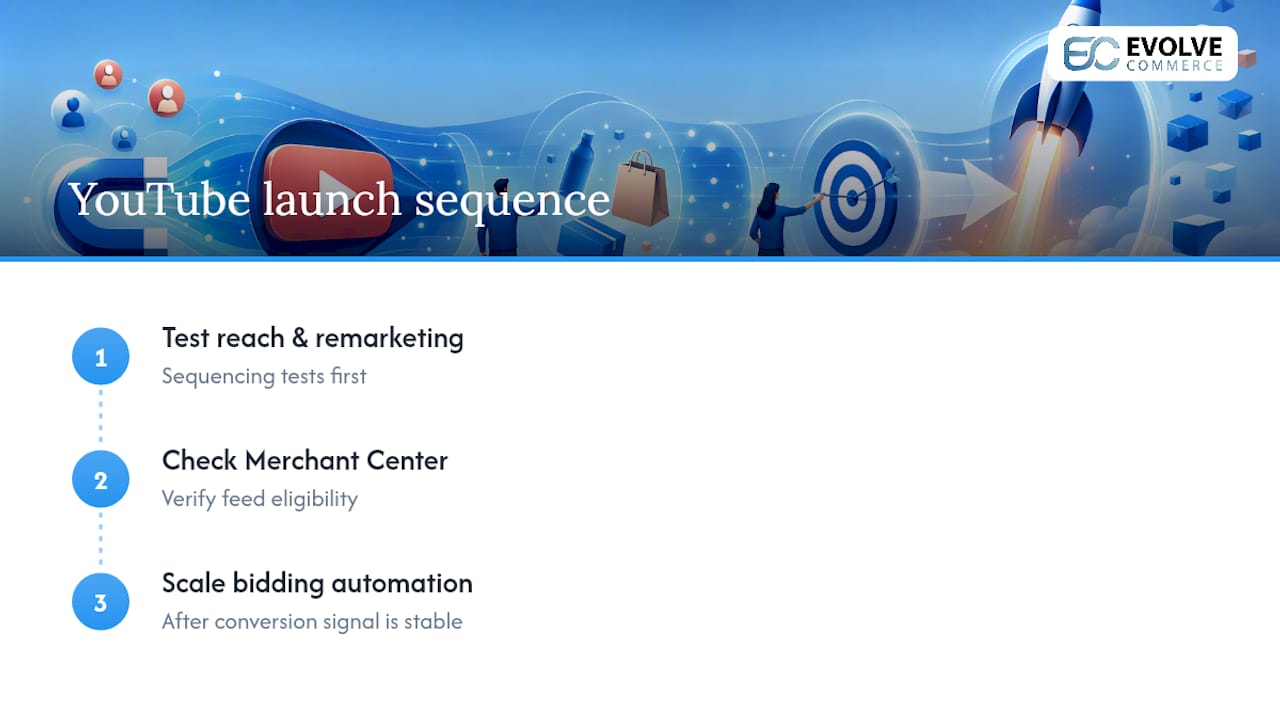
When launching a YouTube programme, Evolve Commerce typically tests reach and remarketing sequencing first, checks Merchant Center feed eligibility second, and only scales bidding automation once conversion signal is stable.
What we check before launching YouTube for ecommerce
Before spending a pound on YouTube, we confirm the plumbing: conversion events firing correctly, Merchant Centre linked to Google Ads, and the YouTube channel connected to the ad account. Skip this and every metric downstream is unreliable.
We then commit to a 30 to 90 day test window covering an awareness campaign and a Video action campaign with a product feed, reviewing at day 14, 30 and 60. During the first two to three weeks, we resist the urge to tinker daily. Google’s algorithms need that learning period to gather signal, and constant manual changes simply restart the clock.
— Evolve Commerce
Get expert help running YouTube ads for your store
Running a proper YouTube ads for ecommerce programme means juggling format selection, audience layering, feed integration, and blended ROAS reporting at the same time, and most in-house teams simply don’t have the hours to test all of it properly within a single quarter. This service is run as a managed offering, combining paid media execution across YouTube, Meta and TikTok with performance creative production and an advanced dashboard for attribution that goes beyond last-click.
Rather than guessing which audience layer or bid strategy is dragging on results, you get server-side tracking that shows what’s actually driving revenue across channels. That clarity is what lets Evolve Commerce clients scale spend with confidence instead of hesitation. If your team is weighing whether to build a YouTube programme internally or hand it to specialists who already run this playbook daily, get in touch with Evolve Commerce to talk through a test plan for your store, or explore the AdWize platform if measurement clarity is your biggest gap right now.