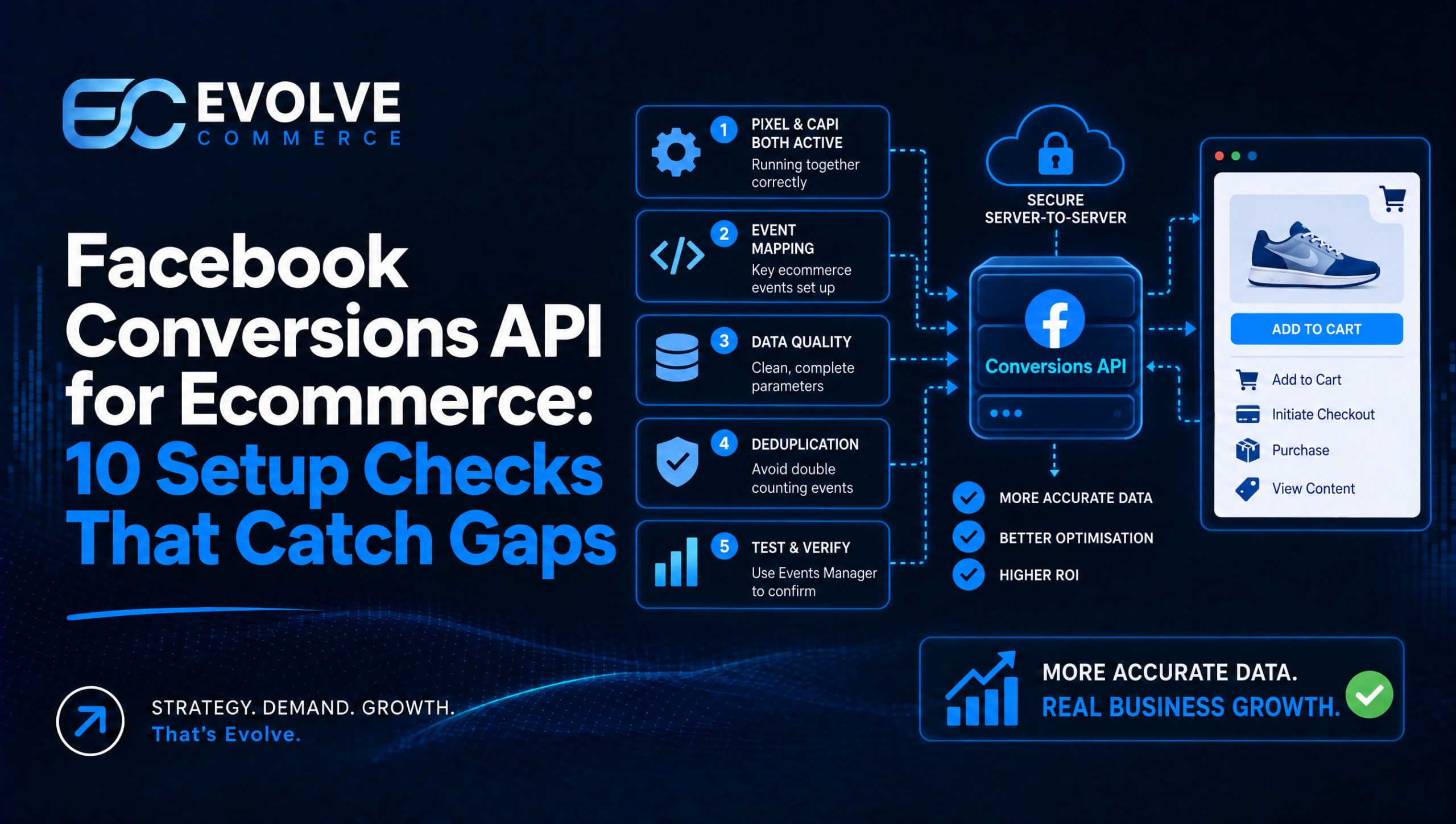
The Conversions API sends conversion events server-to-server to Meta, improving measurement when browser tracking is limited. It gives advertisers a direct line between their own systems and Meta’s ad optimisation engine, filling gaps left by ad blockers, cookie restrictions and iOS privacy settings. For any ecommerce brand running Meta ads, implementing it improves attribution accuracy and campaign performance.
- Run the Pixel and server events together, assigning each conversion the same event ID so Meta deduplicates it instead of counting it twice.
- Choose a custom build when developers are available, a partner connector for standard ecommerce platforms, or Conversions API Gateway for managed hosting without server upkeep.
- Hash email and phone fields with SHA 256, include purchase value and currency, and send only data that genuinely improves matching.
- Test events in Event Manager before launch and clear diagnostic warnings, then monitor match rates and delivery weekly since drops signal mapping or permission issues.
- Expect attributed conversions to rise as missed browser events return, but reset experiment benchmarks because the measurement baseline has changed.
Table of Contents
- What Conversions API is and how it works
- Pixel versus Conversions API: why both together work best
- Choosing how to implement: custom build, partner tools or a gateway
- Step-by-step setup checklist for Conversions API
- Mapping events and user data without oversharing
- Testing and diagnostics: confirming events actually arrive
- How CAPI reshapes reporting, attribution and bidding
- Evolve Commerce: implementation patterns from live ecommerce accounts
- Agency support versus building Conversions API in-house
- How we support Conversions API setup and ongoing measurement
- FAQ
- Sources
What Conversions API is and how it works
The Conversions API is a server-to-server connection between a business’s own systems, such as a web server, CRM or offline conversion sources, or point-of-sale platform, and Meta’s ad systems. Instead of relying solely on a browser to fire a tracking pixel, we send the same conversion events directly from a server, where they cannot be blocked by browser extensions, cookie consent restrictions or ad blockers.
This matters because the Meta Pixel depends entirely on the customer’s browser executing JavaScript and allowing third-party cookies. When a browser blocks that script, or a user has tracking protection switched on, the event never reaches Meta. Server-side delivery removes that single point of failure.
To send events through the Conversions API, a business needs a few core components in place:
- An event source, which is wherever the conversion actually happens (a website, app, CRM or offline till system)
- A server endpoint that can format and transmit event data to Meta’s API
- A valid access token and the correct permissions tied to the Meta ad account
- A consistent event naming and data structure so Meta can read and match events correctly
Common use cases include purchases, lead form completions, and offline conversions such as phone orders or in-store sales that never touch a browser pixel at all. For brands with a sales process that spans channels, this server-side layer is often the only way to get those conversions back into Meta’s optimisation loop.
Pixel versus Conversions API: why both together work best
The Pixel and the Conversions API are not rivals. They are two different capture points for the same conversion, and Meta’s own guidance treats them as complementary rather than alternatives, recommending both running together wherever possible.
The Pixel captures rich browser-side behaviour: page views, scroll depth, add-to-cart clicks, all the signals that happen before a purchase. But it only works when the browser cooperates. The Conversions API captures the server-side record of what actually happened, which tends to be more reliable but has less visibility into the browsing journey itself. Sending both and letting Meta deduplicate overlapping events gives a fuller picture than either source alone.
Here’s how the two typically combine in practice:
- The Pixel fires on the browser when a purchase completes, capturing standard event data and a unique event ID.
- The server independently sends the same purchase event through the Conversions API, tagged with the identical event ID.
- Meta’s deduplication logic matches the two using that shared event ID and counts the conversion once, not twice.
- Consistent event IDs across both sources are what make this matching work. Mismatched or missing IDs cause duplicate counting or lost events.
The practical outcome is better match rates between the events sent and the people Meta can actually identify on its platform, and more stable signal for campaign optimisation. Meta’s developer documentation is explicit that consistent event IDs and properly hashed customer data are what make deduplication work reliably, so this is not an optional detail to tidy up later. It is the mechanism the whole setup depends on.
Choosing how to implement: custom build, partner tools or a gateway
There is no single right way to connect the Conversions API. The choice depends on engineering resource, the complexity of a business’s tech stack and how much ongoing maintenance a team can realistically take on.
A custom server implementation suits businesses with in-house developers and a bespoke backend. It offers the most control over what data gets sent and when, but it also means owning the maintenance burden when Meta updates its API or event specifications.
A partner integration, such as a platform-native connector built into a commerce system or analytics tool, suits teams that want Conversions API benefits without writing and maintaining server code themselves. Many ecommerce platforms now ship with this as a built-in setting rather than a developer project.
Conversions API Gateway is Meta’s own managed-hosting option, designed to reduce the engineering overhead of running a server endpoint by handling much of the infrastructure centrally. It suits teams that want server-side reliability without standing up and patching their own server.
Tag manager or cloud-function routes, using a tool like a server-side tag container, suit smaller teams that want a middle ground: less engineering than a full custom build, but more flexibility than a fixed partner connector.
The decision map usually comes down to this:
- Large in-house dev team and a bespoke stack: custom server implementation
- Standard ecommerce platform with built-in tooling: partner integration
- Want managed infrastructure without running a server: Conversions API Gateway
- Smaller team, some technical comfort, no dedicated backend: tag manager or cloud-function route
Pro Tip: Start with whichever option gets real events flowing within a week. A simpler setup shipped now beats a perfect architecture still in planning three months later.
Step-by-step setup checklist for Conversions API
Getting the Conversions API live is a sequence, not a single task, and skipping steps tends to surface as broken match rates weeks later.
- Verify the business and confirm access. Complete business verification in Meta Business Manager and confirm the ad account has the right admin permissions before generating any tokens.
- Generate access tokens. Create a system user or app-level access token scoped to the ad account that will receive events, and store it securely rather than hardcoding it into client-facing code.
- Set up a test environment. Use a separate test event code so implementation events don’t pollute live campaign data while the setup is being built.
- Instrument server events. Add code at each conversion point, website checkout, lead form, offline sales system, to send structured event data to the Conversions API endpoint.
- Generate consistent event IDs. Attach the same event ID to both the Pixel-side and server-side version of each event so Meta’s deduplication can match them correctly.
- Configure Event Manager. In Meta’s Event Manager, confirm the data source is recognised and set deduplication rules against the event ID field.
- Run test events. Use the Event Manager test-events tool to confirm events arrive with the expected parameters before anything goes live.
- Resolve diagnostics warnings. Fix flagged issues, missing parameters, incorrect hashing, mismatched currencies, shown in the diagnostics tab before switching off test mode.
- Deploy to production. Move from test event code to live delivery once diagnostics are clean.
- Monitor match rates and delivery. Track event delivery success and match-rate percentages weekly; Meta’s tools documentation notes that server-side events tend to improve measured conversion counts and match rates compared with client-only tracking, which makes this the key metric to watch after launch.
Match rate and delivery latency are the two KPIs that matter most in the first month, since a drop in either usually signals a mapping or permissions issue rather than an ad performance problem.
Mapping events and user data without oversharing
Choosing the right events and mapping user data correctly is what actually drives match-rate improvements, more than the implementation method itself.
Standard events cover most ecommerce needs: Purchase, AddToCart, InitiateCheckout and Lead are the ones Meta’s optimisation algorithms recognise natively and use for campaign bidding. Custom events are worth creating only when a business has a conversion action genuinely outside these categories, such as a free-sample request or a loyalty sign-up with its own value to the business.
On user data, a few fields do most of the matching work:
- Email address, hashed before sending, is the single strongest match signal
- Phone number, also hashed, as a secondary match field
- Client-generated IDs such as a browser or app-generated identifier to help link sessions across devices
- Hashing method: Meta expects SHA-256 hashing applied to personal fields before transmission, never raw text
On parameters, prioritise value and currency on every purchase event, since these feed directly into ROAS reporting, and keep content_type and naming conventions consistent across every event source so Meta’s systems read them the same way regardless of where they originated.
The privacy-conscious approach is to send only the fields that genuinely improve matching, properly hashed, rather than every data point available. Oversharing does not meaningfully improve match rates and adds unnecessary handling of personal data.
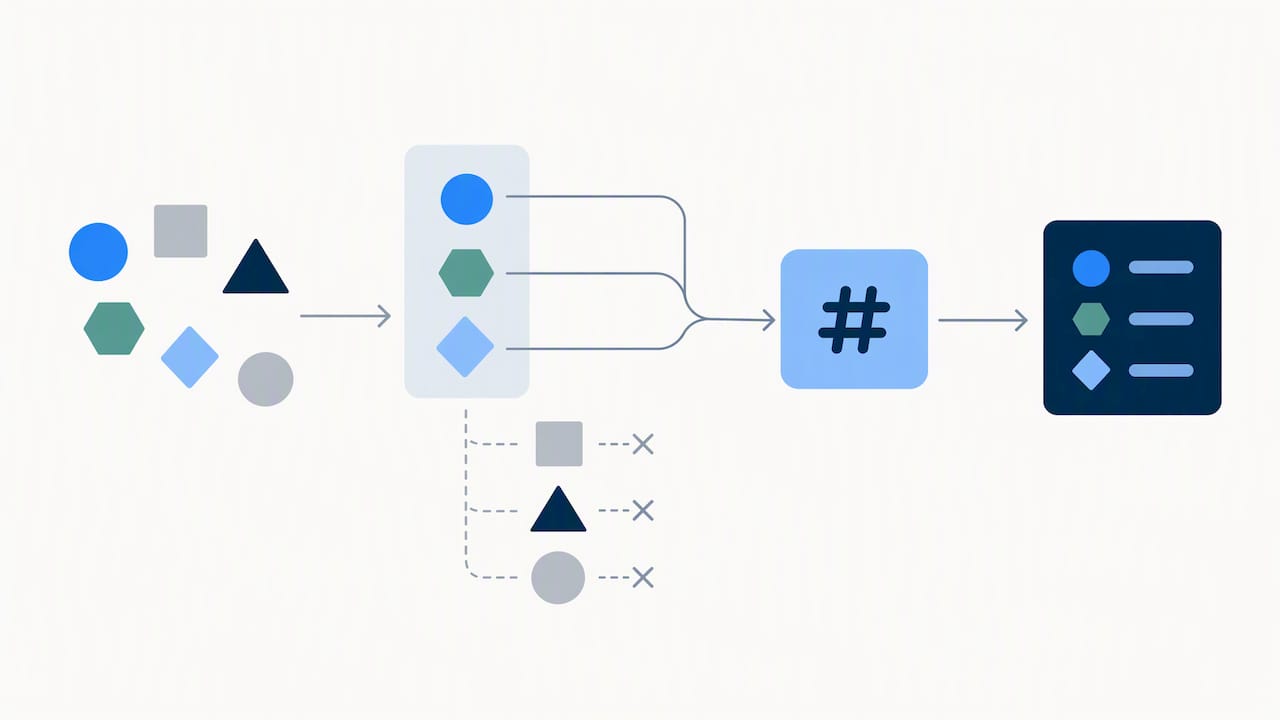
Testing and diagnostics: confirming events actually arrive
A Conversions API setup that looks correct in code can still fail silently, so testing before and after launch is not optional.
Meta’s Event Manager provides the primary testing surface. The test-events tab shows exactly which events arrive, with what parameters, in close to real time, which makes it the fastest way to catch a malformed payload before it reaches production.
- Check the diagnostics tab for flagged errors such as missing required parameters or incorrectly formatted hashed fields.
- Review deduplication logs to confirm Pixel and server events with matching event IDs are being merged rather than double-counted.
- Set a baseline match-rate percentage in the first week, then watch for drops that signal a broken field or expired token.
- Schedule a recurring monthly check even after launch, since platform updates or site changes can quietly break event delivery.
Pro Tip: Treat a sudden match-rate drop as a diagnostics problem first, not a campaign problem. Check Event Manager before touching bids or budgets.
How CAPI reshapes reporting, attribution and bidding
Once reliable server-side data is flowing, the numbers in Meta’s ads reporting tend to shift, and teams need to read that shift correctly rather than assume campaigns suddenly got better.
- Attributed conversions often rise because events that browser tracking missed are now being counted, which clarifies ROAS rather than inflating it artificially.
- Deduplication is what keeps those counts accurate; without matching event IDs, the same purchase could appear twice and distort reporting.
- Bidding algorithms optimise more effectively with a fuller, more consistent event stream, since Meta’s systems need reliable signal to find similar high-value customers.
- Treat the first few weeks of new CAPI data as a reset point for any ongoing A/B tests or experiment benchmarks, since the comparison data itself has changed.
Server-side events work best as one layer of a broader measurement approach rather than a complete replacement for other methods. Pairing CAPI data with cross-channel attribution modelling or marketing mix modelling gives a more resilient view when any single platform’s tracking has gaps, which is increasingly the norm across the industry as cookie-based tracking continues to change. For campaign-level tactics that benefit from cleaner conversion data, our guide to optimising Facebook pay-per-click strategy covers the adjustments worth making once match rates stabilise.
Evolve Commerce: implementation patterns from live ecommerce accounts
We build Conversions API implementations as part of full-funnel growth engagements for ecommerce and retail brands, gaining insight into common mapping mistakes and monitoring gaps across different platforms and sectors.
A few patterns show up consistently in our work:
- We use a standard mapping template for event parameters (value, currency, content_type) to ensure server-side data is consistently formatted inside ad accounts.
- We set a weekly alerting cadence on match rate and delivery success instead of only checking during campaign issues.
- We pair server-side event data with the AdWize analytics dashboard, which brings server-side attribution and performance data into one view rather than leaving it scattered across platforms.
In the early weeks after a Conversions API setup goes live, success looks like a stable or rising match-rate percentage and clean diagnostics with no recurring errors, well before any shift in ad spend or bidding strategy.
— Evolve Commerce
Agency support versus building Conversions API in-house
The right choice depends on scale and how many channels need to stay in sync, not on how technically difficult the Conversions API itself is.
In-house implementation suits a business with developer capacity, a single primary ad platform and no urgent need to connect analytics across channels. A smaller catalogue and a straightforward checkout flow make this manageable without external help.
Agency support makes more sense once a brand runs paid media across several platforms, needs consistent event mapping across all of them, and wants that data feeding into one analytics system rather than several disconnected dashboards. A typical engagement starts with an audit of existing tracking, identifies the quickest fixes to match-rate or delivery issues, then builds out a longer-term roadmap for scaling the setup as campaigns grow.
How we support Conversions API setup and ongoing measurement
We handle Conversions API implementation as part of paid media and analytics work, connecting server-side event data into campaigns across multiple channels to support a brand’s full marketing stack.
A client engagement typically includes:
- Server-side event mapping and deduplication setup tied to each platform a brand advertises on
- Ongoing monitoring of match rates and delivery, with alerts built into our reporting rather than left to manual checks
- Integration with AdWize, our analytics platform, for a single view of server-side attribution alongside creative and channel performance
If reliable conversion data matters to how a brand plans spend, our 360° Marketing Audit is the usual starting point, reviewing current tracking before recommending the right setup and plan.
FAQ
What is the Facebook Conversions API?
The Facebook Conversions API is a server-to-server connection that sends conversion events, such as purchases and leads, directly from a business’s own systems to Meta’s ad platform. It improves measurement accuracy by capturing events that browser-based tracking alone can miss.
Is Meta Conversions API free to use?
Meta does not charge a separate fee for using the Conversions API itself, as Meta’s own business help resources confirm it is part of the platform’s standard tooling. Costs instead come from ad spend and any engineering time or third-party connector fees needed to send the events.
How do I set up Conversions API on Facebook?
Setup involves verifying the business in Meta Business Manager, generating access tokens, instrumenting server-side events with consistent event IDs, and testing everything through Event Manager before going live. Options range from a custom server build to partner integrations or Meta’s own Conversions API Gateway, depending on available engineering resource.
What is the difference between Facebook Pixel and Conversions API?
The Pixel captures browser-side activity using JavaScript, which can be blocked by ad blockers or browser privacy settings, while the Conversions API sends the same event data directly from a server, bypassing those browser-level restrictions. Meta recommends running both together and matching events with a shared event ID so its systems can deduplicate and count each conversion once.